mes-line 2.0 is here: 106 MCP tools across 11 domains let AI handle data acquisition, monitoring, changeovers, dispatching and HMI development in plain language — while 34 high-risk actions stay behind human approval. AI does the work; humans hold the trigger.
The Short Version
mes-line 2.0 is officially here, and it comes down to one thing: through MCP (Model Context Protocol), we open the entire action surface of a manufacturing execution system — 106 tools across 11 business domains (as measured on 2026-09-07) — to any AI client. Data acquisition, line monitoring, alarm triage, cloning a new machine from a model, dispatching rules, even building custom HMI applications: work that used to keep specialists busy for days now happens in plain language. And the 34 high-risk actions? Every single one waits for a human to pull the trigger on the approval page. AI does the work; humans hold the trigger. That is what we believe "bringing AI into smart manufacturing" should actually mean.
The Flag We Planted, Now Delivered
On August 10 we published a post: *mes-line Shouldn't Be an Agent. It Should Be the Agent's Hands.* It was a public course correction: we had once packaged mes-line as a "conversational agent," then realized a production system shouldn't pretend to be AI — it should turn its capabilities into hands that AI can safely use.
At the time, that was a direction. Today it is a product:
- The built-in mesline_agent has been physically deleted; AI capability leaves through exactly one door — the MCP service;
- 106 tools, 11 business domains, 34 high-risk approvals (2026-09-07, always verifiable via tools/list);
- 780 tests, all green, backed by a three-gate CI pipeline (full test suite, hard-blocked F821 lint, contract meta-tests);
- A real AI client (Tencent WorkBuddy) completed full-line acceptance as an agent: device onboarding, data acquisition, nine versions of an HMI app, and 70+ approval tickets through their entire lifecycle.
From "clear direction" to "shipped product" in two months. The reason isn't crunch — it's that mes-line V2 was rebuilt on foundations designed to be *safely operable by AI*: the permission matrix, the approval loop and the audit trail were never bolted on afterwards.
Manufacturing Needs AI That Doesn't Guess
In consumer apps, AI hallucination is a UX problem: if the answer isn't perfect, ask again.
On a production line, hallucination is an incident:
- Guess one register address wrong and every value collected afterwards is wrong — alarms, OEE, quality traceability all follow, and you might not notice for weeks;
- A recipe parameter that is "about right" can scrap an entire batch;
- An alarm casually acknowledged by AI may bury a real equipment failure.
What manufacturing demands of AI comes down to three words: determinism, safety, traceability. No guessing. Zero tolerance.
That's why "hook a chatbot up to the shop floor" is not the answer. However strong a general-purpose LLM is, it lacks three things in front of your line: it cannot see your real-time data, it cannot reach your equipment actions, and there is no mechanism that makes it accountable when something goes wrong. Before AI can work the floor, it needs hands — and those hands need gloves: able to work, unable to grab.
Why MCP, Not Another Custom API
MCP (Model Context Protocol) is the open standard for connecting AI clients to software systems. We bet all of mes-line's AI capability on it for three reasons:
- Tools are the contract. Every tool has a fixed name, parameters, permission level and approval requirement. What the AI faces is not an open world of free-form chat, but a menu of 106 dishes — it can order, it cannot rewrite the menu, and it cannot walk into the kitchen. If it guesses, it can only guess within those 106 slots; stepping outside them is physically impossible.
- The ecosystem is the entrance. Any MCP-capable client — WorkBuddy, Hermes, Claude and others — connects with a URL and a Bearer token. We don't lock you to one AI vendor, and your line shouldn't be locked to one either.
- The boundary is the professionalism. Data-ingress channels (device uploads, auto-collection, batch loads) are never wrapped as MCP tools — they are the data pipeline for devices and HMIs, not an AI playground. AI may do what a *person* does; it may not do what the *system* does.
In one sentence: MCP turns "what AI can do" into "what the system allows it to do." That boundary is exactly the determinism manufacturing asks for.
106 Tools: The Whole Action Surface of a Line
First, the panorama.
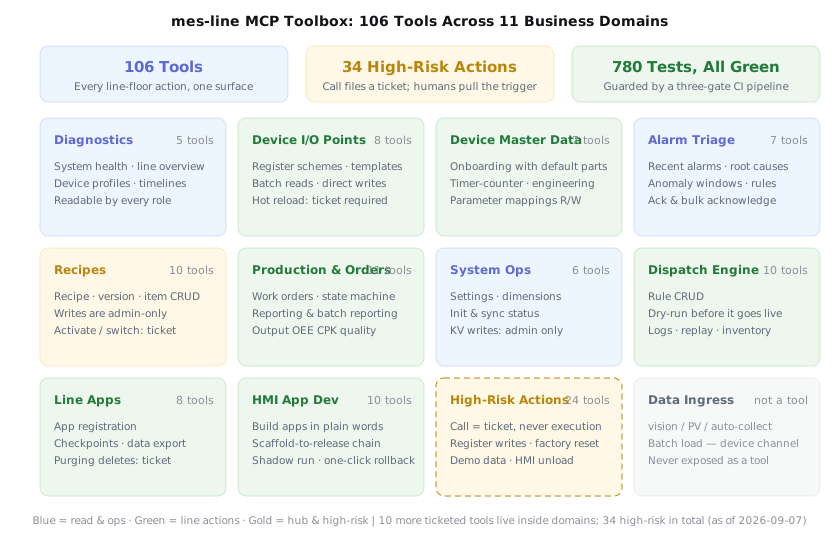
106 tools across 11 domains; all 34 high-risk actions go through approval (as of 2026-09-07)
| Domain | Tools | What it covers (highlights) |
|---|---|---|
| Read-only diagnostics | 5 | System health, line overview, device profiles & timelines |
| Device I/O points | 8 | Register schemes, points & templates, batch reads |
| Device master data | 7 | Device onboarding, timer-counter mapping, parameter mappings |
| Alarm triage | 7 | Recent alarms, statistics, rule upkeep, bulk acknowledge |
| Recipe management | 10 | Recipes, versions, items; activation via approval |
| Production & orders | 11 | Work-order flow, reporting, output / OEE / CPK / quality |
| System operations | 6 | Settings, init & sync status |
| Dispatch engine | 10 | Rule CRUD, dry-run preview, logs & replay |
| Line Apps | 8 | App registration, checkpoints, data export |
| HMI app development | 10 | Natural-language app building, scaffold to rollback |
| High-risk actions | 24 | Ticket-only: register writes, factory reset, demo data |
| Total | 106 | Plus 10 ticketed tools inside other domains; 34 high-risk in all |
The granularity is deliberate: the server only exposes thin tools — one tool, one clear business action. Composite flows like "spin up a new machine from model T5" are orchestrated by the AI client across multiple turns. The payoff: every action can be authorized, audited and rolled back individually. No composite operation hides inside a black box.
What Specialists Used to Do, Now Done in Plain Language
Two real conversations to start:
- "How's the line today?" — the AI calls the line-overview tool and answers with output, utilization and alarms in one paragraph. No logging in, no clicking through five screens.
- "What does this alarm mean?" — the AI pulls recent alarms and statistics, tells you which rule fired, how often lately, and where the root cause might be.
Then it gets serious. mes-line's acceptance test isn't a handful of test cases — it's a real AI client (WorkBuddy), operating as an agent with all 106 tools, building an entire line business from scratch:
- Device onboarding: an oven engineering project, oven unit No. 1 (a timer device), upper and lower controller components;
- Acquisition chain: a dual-register scheme with 16 points, component binding, DAQ started — 127,000 rows of real data persisted, plus auto-start on boot;
- HMI app: a touchscreen monitoring panel iterated through nine versions (v0.1.0 → v0.3.5) — layout rework, chart rebuild, large-screen typography, a touch numeric keypad — every release through the scaffold → bundle → validate → shadow-run → approved-activation chain;
- Business data: recipes, work orders, reporting, production details, OEE;
- Approvals: 70+ real tickets, each one submitted, approved, executed and closed.
This used to be a small team's job — instrument engineers building point tables, IT configuring acquisition, developers writing UIs, days of coordination. Now it's one person describing the need to an AI, approving what needs approving, done in an hour or two. This isn't about replacing anyone; it's about making "everyone can direct the line system" real — the plant manager doesn't wait for IT's queue, the shift lead doesn't memorize menu paths.
"Access" Means Three Things in Manufacturing
Ask about "access" (接入了) in a factory and you'll get three different answers. For mes-line 2.0, it has three layers.
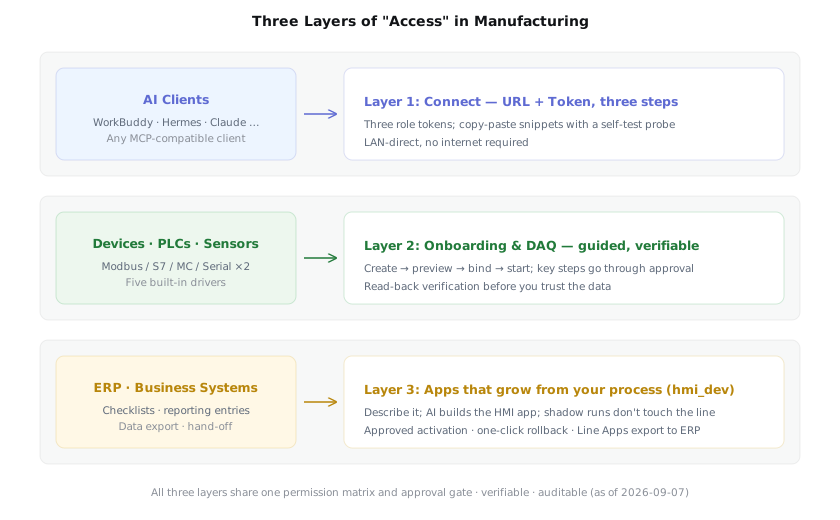
System, devices, ERP: three layers of access, one shared permission and approval gate
Layer 1: Connect the AI — URL + Token, three steps
Configure three role tokens server-side (admin / operator / viewer); the client fills in a URL, pastes a token, done. The admin panel's MCP section copies connection snippets in one click, includes a token generator, and ships with a self-test probe. The deployment shape is the one manufacturers like: LAN-direct, no internet required.
Layer 2: Onboard the devices, acquire the data — guided, not "fully automatic"
Some vendors advertise: drop in a device document and the acquisition config configures itself. Sounds great — but device onboarding is precisely where "fully automatic" is most dangerous. One wrong register address and every value afterwards is wrong; wrong data flows into alarms, OEE and quality traceability, and you may not notice for weeks.
mes-line's answer is AI-guided, human-confirmed, verifiable at every step: creating a device auto-generates default components → point templates are previewed before they're applied (approval ticket) → scheme binding (ticket) → acquisition start/stop (ticket) → after collection, a batch read-back verifies the values. Say "spin up a new machine from model T5" and the AI walks this whole chain; you click approve twice and it reports back.
Fast — not by skipping confirmation, but by making confirmation as cheap as saying a sentence. Five drivers are built in today: Modbus, S7, MC protocol, and two serial variants.
Layer 3: Bridge to ERP — apps that grow from your process
Every factory reports work differently, keeps different checklists, hands off documents differently. That's exactly what the hmi_dev domain is for: you describe it, AI builds it. Ten tools cover the full chain — scaffold, bundle, validate, shadow-run (a rehearsal against the live environment that never disturbs the line), approved activation, one-click rollback, on-site repair. You speak plain language the whole way; you never look at a line of code.
Together with Line Apps registration, checkpoint submission and data export, plus the open data-ingress channel, the bridge between line data and your ERP grows from your actual process. We won't claim an "out-of-the-box ERP connector" — we offer the development capability to grow apps that fit your process, which holds up better across the messy variety of real factories.
Complex Dispatch Logic, Spoken Aloud
Scheduling and interlocks are where manufacturing experience lives: rules in a veteran's head either stay on paper with a human watching, or get translated into expressions by the one person who understands them — and every change means booking their time again.
The mes-line 2.0 dispatch engine offers a third way: tell the rules to the AI. Ten dispatch tools cover rule CRUD, dry-run, execution logs with replay, and material inventory. The key step is dry-run: after translating your natural language into dispatch rules, the AI runs a rehearsal and shows you what *would* happen if the rule went live; you confirm, it goes through approval and takes effect; if anything's off, logs and replay are there to reproduce it.
Natural language in, determinism out — dry-run is the determinism gate on this chain. For the first time, a veteran's experience can be spoken to the system directly, no expression syntax required.
The Trigger Stays Human: One Approval Loop, One Set of Gates
At this point someone always asks: letting AI touch the production line — are you out of your minds?
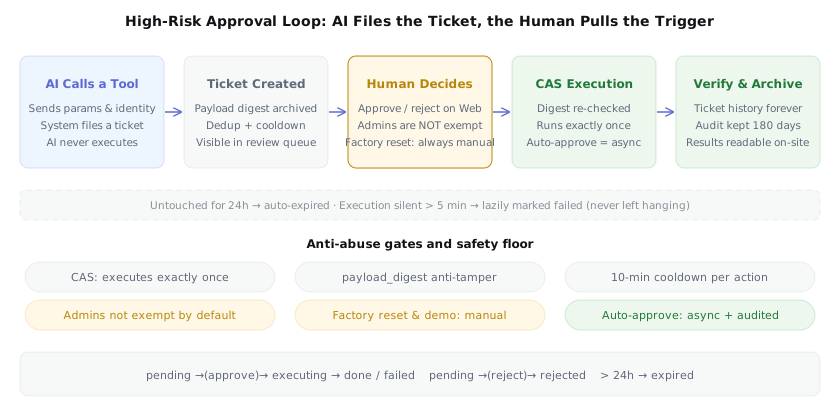
The full loop: AI files the ticket, a human pulls the trigger on the Web approval page, everything audited
mes-line 2.0's answer: the AI never touches the trigger. For all 34 high-risk actions — recipe activation and version switching, PLC scheme deletion and point edits, DAQ start/stop, register writes, factory reset, HMI load/unload, dispatch rule triggering and replay, HMI app activation and rollback — an AI call merely files an approval ticket. Execution lives on the Web approval page, and it belongs to people.
The mechanics under the hood:
- Concurrency-safe: CAS-guarded execution — even if the same ticket is approved twice in parallel, it executes exactly once;
- Tamper-proof: the payload digest is archived at submission and re-checked before execution; a modified ticket is refused;
- Abuse-resistant: identical actions are deduplicated, equivalent actions hit a 10-minute cooldown; tickets untouched for 24 hours expire automatically;
- No exemptions: admins go through approval by default; factory reset and demo data are permanently manual — no switch can reach them;
- Automatable when appropriate: a local admin can switch approvals to "auto-approve" — submission triggers async execution with pollable results and full audit records, for debugging and controlled scenarios;
- Archived: audit logs auto-purge after 180 days; approval tickets are kept forever.
Permissions come in three role tiers:
| Role | Read | Low-risk writes | High-risk actions |
|---|---|---|---|
| viewer | ✅ | ❌ | ❌ |
| operator | ✅ | ✅ | Can only file approval tickets |
| admin | ✅ | ✅ | Requires approval (auto-approve optional) |
And the deeper principle: one set of gates for AI and humans alike. The permission rules on the MCP side and the Web side are identical — what AI can do, a person on the Web cannot do more of; there is no side channel where AI "bypasses the web UI and writes the database." In engineering terms: all 334 business routes are untouched; MCP's only point of entry into the codebase is a single service-credential function. That restraint isn't conservatism — it's what keeps the system maintainable for years.
Everything Else in 2.0, and the Right Way to Bring AI Onto the Floor
Beyond MCP, 2.0 ships a batch of unglamorous hard work, in one paragraph: the recipe-activation hub (version snapshots, mutually exclusive activation, work-order switching); OEE recomputed every minute with plant-level aggregation, CPK with a finalized methodology and on/off switches; five DAQ drivers (Modbus, S7, MC with half-frame self-healing, two serial variants); retention operations for a 137-million-row alarm table; 780 tests and a three-gate CI pipeline holding the line.
And back to where we started: the right way to bring AI onto the shop floor is not to install a "chatty box" in the workshop. It's to let a professional system grow a pair of hands that can be *safely operated by AI*. On this road, production systems that can be safely operated by AI are still rare today — most either lock AI out, or let it run loose.
mes-line 2.0 chooses to extend its entire action surface while leaving the trigger in your hands. Seventy-plus real approval tickets through their full lifecycle — not a demo, an acceptance test. If you'd like AI to genuinely work your line — acquisition, monitoring, integration, dispatch, custom apps — talk to us.