Tsingley opens Remotely — free remote operations for manufacturers. Register and complete company verification, then manage up to 30 devices under one company account, with RDP tuned for small industrial screens and a Web terminal built for AI Agents. China + Singapore nodes, expanding.
In one sentence
Remotely is Tsingley’s free remote operations service for manufacturers. Devices live at the customer site while engineers are miles away — through a browser you can control desktops, run terminals, and transfer files. Three words sum it up: free, enterprise-grade, AI-Agent-friendly.
Why free actually works
Most B2B remote tools charge by year, by device, or by seat. Tsingley chose not to. Remotely is free, with no ads, no upsell popups, and no selling your data. Four principles back that up:
- Manufacturing only: no consumer use, no generic internet — resources flow to companies with real device O&M needs.
- Company verification as the gate: submit a business license or contract to activate, which prevents abuse and meets traceability requirements for remote access.
- No ads, no tricks: free means free — you get a clean, focused O&M tool.
- Backed by existing customers: today’s main users are Tsingley’s manufacturing customers, and we keep investing in this free service for the long term.
Global access nodes: connect from the nearest edge
Nothing hurts remote O&M like cross-border detours. Remotely runs global access nodes — China and Singapore today, expanding — following our manufacturing customers’ global footprint so devices can always connect from the nearest edge.
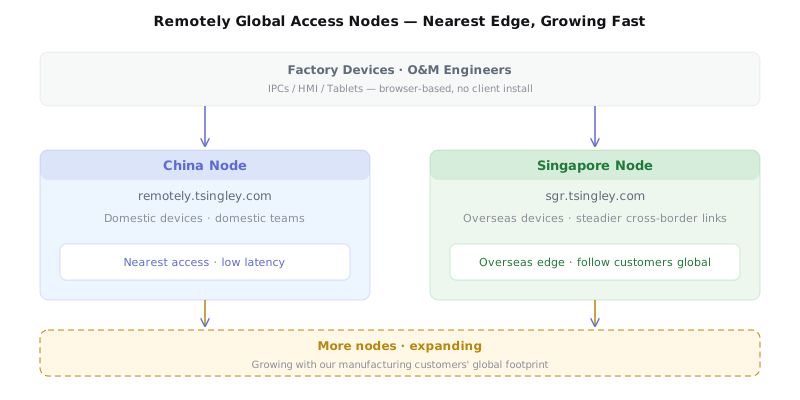
China node serves domestic devices; Singapore node gives overseas devices a nearer edge. More nodes are on the way.
Company-first, not individual-first
Personal remote tools connect a person to a device — the account belongs to the employee, and when they leave, that link breaks. Remotely connects a company to a fleet — assets, logs, and access all belong to the company.
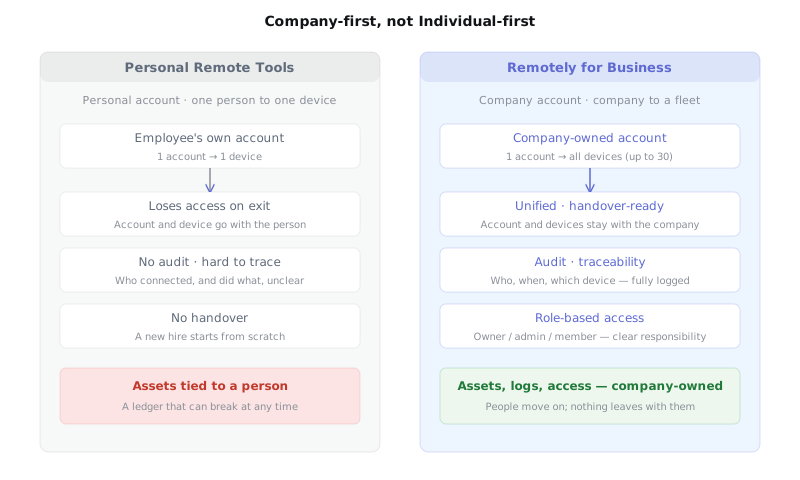
On the left, a link that can break at any time. On the right, an asset that stays when people move on.
Six enterprise capabilities turn remote O&M from an individual act into a company asset:
- Unified management: one account for all devices.
- Company-owned accounts: devices and records belong to the company, not an individual.
- Handover: no device lost when someone leaves.
- Audit: every operation logged.
- Login traceability: who, when, which device.
- Role-based access: owner / admin / member.
Highlight one: nearly every platform
Windows, Linux, macOS IPCs, Android tablets, embedded devices — Remotely connects them all with one lightweight Agent. Engineers don’t need a different tool per system; one Remotely covers almost everything on the floor.
Highlight two: RDP tuned for small industrial screens
7-inch and 10-inch industrial HMIs are common: low resolution, tiny text, small touch targets. Remotely’s RDP remote desktop optimizes resolution and screen size for these small screens — what the engineer sees is what the operator sees.
Highlight three: a terminal that AI Agents love
Remotely ships a Web terminal (SSH) — the most natural interface for today’s AI Agent tools. Engineers can log into a device terminal and run CLI tools right in the device environment, connecting remote O&M with AI assistance. That’s exactly why we’re launching Remotely now.
Two practical tips
Tip one: install OpenSSH on Windows, run CLIs in the terminal. Windows 10/11 ship an OpenSSH server. Once enabled, Remotely’s Web terminal connects as a full login shell and inherits all environment variables (PATH, etc.), so you can run codex, openClaude, hermes and other CLI tools remotely.
Tip two: passwordless RDP + resolution. After setting a Windows password, use Credential Manager or Group Policy to auto-fill RDP credentials. Remotely’s RDP also adjusts resolution and scaling to make small screens sharp and comfortable.
Service specs
- Up to 30 devices per company.
- TLS-encrypted data transfer end to end.
- Browser-based admin, lightweight cross-platform Agent.
- Devices and O&M data belong to the company.
How to get started
- Step 1: sign up at www.tsingley.com.
- Step 2: submit company verification (business license or contract) in your account center.
- Step 3: once approved, enable the Remotely service.
- Step 4: get your company account and sign in at remotely.tsingley.com or sgr.tsingley.com.